
JIIT ACADEMY

JIIT ACADEMY

This DUAL LANGUAGE (Hindi & English)blog is about Learning Basics of Computer, Complete Course on Ms-Office (Ms-Word, Ms-Excel, Ms-Powerpoint, Ms-Access), Complete Course on Computer Accounting (Tally Accounting with GST), Complete DTP course (Photoshop, Corel Draw), Course on Programming (C, C++, Java, Visual Basic, Python), General Knowledge. Current Affairs. Math Tricks, Digital Marketing, Blogging, Web site Development.

Latest courses - C, C++, JAVA, BLUEJ

test


Friday, June 12, 2020

What is Internet? Define Internet. Uses of Internet.

June 12, 2020
What is Internet? Define Internet. Uses of Internet.

Introduction

The Internet is an increasingly important part of everyday life for people around the world. But if you've never used the Internet before, all of this new information might feel a bit confusing at first.

Throughout this tutorial, we'll try to answer some basic questions you may have about the Internet and how it's used. When you're done, you'll have a good understanding of how the Internet works, how to connect to the Internet, and how to browse the Web.

What is the Internet?

The Internet is a global network of billions of computers and other electronic devices. With the Internet, it's possible to access almost any information, communicate with anyone else in the world, and do much more.

You can do all of this by connecting a computer to the Internet, which is also called going online. When someone says a computer is online, it's just another way of saying it's connected to the Internet.
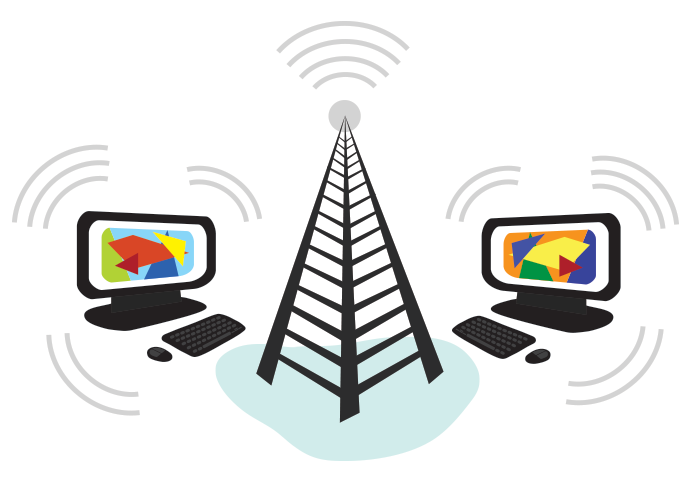
The Internet is the best example of many data networks from different organizations all operating under a single address space. Terminals attached to TCP/IP networks are addressed using IP addresses. There are different types of IP address, but the most common is IP Version. Each unique address consists of 4 integers between 0 and 255, usually separated by dots when written down, e.g. 82.131.34.56. TCP/IP are the fundamental protocols that provide the control and routing of messages across the data network.

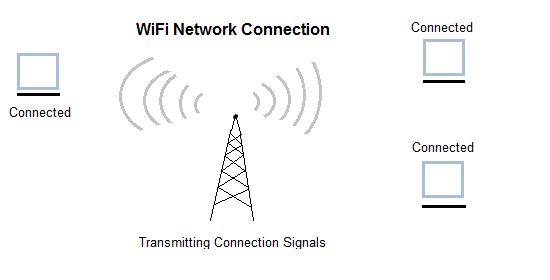
Computers wirelessly connecting to the Internet


How does the Internet work?

At this point you may be wondering, how does the Internet work? The exact answer is pretty complicated and would take a while to explain. Instead, let's look at some of the most important things you should know.

It's important to realize that the Internet is a global network of physical cables, which can include copper telephone wires, TV cables, and fiber optic cables. Even wireless connections like Wi-Fi and 3G/4G rely on these physical cables to access the Internet.

When you visit a website, your computer sends a request over these wires to a server. A server is where websites are stored, and it works a lot like your computer's hard drive. Once the request arrives, the server retrieves the website and sends the correct data back to your computer. What's amazing is that this all happens in just a few seconds!

Other things you can do on the Internet

One of the best features of the Internet is the ability to communicate almost instantly with anyone in the world. Email is one of the oldest and most universal ways to communicate and share information on the Internet, and billions of people use it. Social media allows people to connect in a variety of ways and build communities online.

There are many other things you can do on the Internet. There are thousands of ways to keep up with news or shop for anything online. You can pay your bills, manage your bank accounts, meet new people, watch TV, or learn new skills. You can learn or do almost anything online.


What is the Web?

The World Wide Web—usually called the Web for short—is a collection of different websites you can access through the Internet. A website is made up of related text, images, and other resources. Websites can resemble other forms of media—like newspaper articles or television programs—or they can be interactive in a way that's unique to computers.

The purpose of a website can be almost anything: a news platform, an advertisement, an online library, a forum for sharing images, or an educational site like us!

Once you are connected to the Internet, you can access and view websites using a type of application called a web browser. Just keep in mind that the web browser itself is not the Internet; it only displays websites that are stored on the Internet.


Connecting to the Internet

How do I connect to the Internet?

Once you've set up your computer, you may want to purchase home Internet access so you can send and receive email, browse the Web, stream videos, and more. You may even want to set up a home wireless network, commonly known as Wi-Fi, so you can connect multiple devices to the Internet at the same time.

Types of Internet service

The type of Internet service you choose will largely depend on which Internet service providers (ISPs) serve your area, along with the types of service they offer. Here are some common types of Internet service.

  • Dial-up: This is generally the slowest type of Internet connection, and you should probably avoid it unless it is the only service available in your area. Dial-up Internet uses your phone line, so unless you have multiple phone lines you will not be able to use your landline and the Internet at the same time.
  • DSL: DSL service uses a broadband connection, which makes it much faster than dial-up. DSL connects to the Internet via a phone line but does not require you to have a landline at home. And unlike dial-up, you'll be able to use the Internet and your phone line at the same time.
  • Cable: Cable service connects to the Internet via cable TV, although you do not necessarily need to have cable TV in order to get it. It uses a broadband connection and can be faster than both dial-up and DSL service; however, it is only available where cable TV is available.
  • Satellite: A satellite connection uses broadband but does not require cable or phone lines; it connects to the Internet through satellites orbiting the Earth. As a result, it can be used almost anywhere in the world, but the connection may be affected by weather patterns. Satellite connections are also usually slower than DSL or cable.
  • 3G and 4G: 3G and 4G service is most commonly used with mobile phones, and it connects wirelessly through your ISP's network. However, these types of connections aren't always as fast as DSL or cable. They will also limit the amount of data you can use each month, which isn't the case with most broadband plans.

Hardware needed

Modem
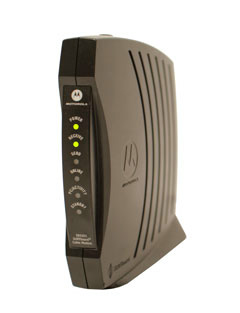
a broadband modem

Once you have your computer, you really don't need much additional hardware to connect to the Internet. The primary piece of hardware you need is a modem.

The type of Internet access you choose will determine the type of modem you need. Dial-up access uses a telephone modem, DSL service uses a DSL modem, cable access uses a cable modem, and satellite service uses a satellite adapter. Your ISP may give you a modem—often for a fee—when you sign a contract, which helps ensure that you have the right type of modem. However, if you would prefer to shop for a better or less expensive modem, you can choose to buy one separately.

Router
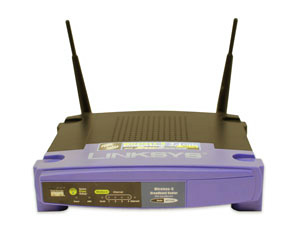
a wireless router

A router is a hardware device that allows you to connect several computers and other devices to a single Internet connection, which is known as a home network. Many routers are wireless, which allows you to create a home wireless network, commonly known as a Wi-Fi network.

You don't necessarily need to buy a router to connect to the Internet. It's possible to connect your computer directly to your modem using an Ethernet cable. Also, many modems include a built-in router, so you have the option of creating a Wi-Fi network without buying extra hardware.

Setting up your Internet connection

Once you've chosen an ISP, most providers will send a technician to your house to turn on the connection. If not, you should be able to use the instructions provided by your ISP—or included with the modem—to set up your Internet connection.

After you have everything set up, you can open your web browser and begin using the Internet. If you have any problems with your Internet connection, you can call your ISP's technical support number.

Home networking

If you have multiple computers at home and want to use all of them to access the Internet, you may want to create a home network, also known as a Wi-Fi network. In a home network, all of your devices connect to your router, which is connected to the modem. This means everyone in your family can use the Internet at the same time.

Your ISP technician may be able to set up a home Wi-Fi network when installing your Internet service.


Uses of Internet or 

What Can You Do Online?

Introduction

There's almost no limit to what you can do online. The Internet makes it possible to quickly find information, communicate with people around the world, manage your finances, shop from home, listen to music, watch videos, and much, much more. Let's take a look at some of the ways the Internet is most commonly used today.

Finding information online

With billions of websites online today, there is a lot of information on the Internet. Search engines make this information easier to find. All you have to do is type one or more keywords, and the search engine will look for relevant websites.

For example, let's say you're looking for a new pair of shoes. You could use a search engine to learn about different types of shoes, get directions to a nearby shoe store, or even find out where to buy them online!

There are many different search engines you can use, but some of the most popular include Google, Yahoo!, and Bing.

Email

Short for electronic mail, email is a way to send and receive messages across the Internet. Almost everyone who uses the Internet has their own email account, usually called an email address. This is because you'll need an email address to do just about anything online, from online banking to creating a Facebook account.

Social networking

Social networking websites are another way to connect and share with your family and friends online. Rather than sharing with just a few people over email, social networks make it easier to connect and share with many people at the same time. Facebook is the world's largest social networking site, with more than 1 billion users worldwide.

Chat and instant messaging

Chat and instant messaging (IM) are short messages sent and read in real time, allowing you to converse more quickly and easily than email. These are generally used when both (or all) people are online, so your message can be read immediately. By comparison, emails won't be seen until recipients check their inboxes.

Examples of instant messaging applications include Yahoo Messenger and Google Hangouts. Some sites, like Gmail and Facebook, even allow you to chat within your web browser.

Online media

There are many sites that allow you to watch videos and listen to music. For example, you can watch millions of videos on YouTube or listen to Internet radio on Pandora. Other services, like Netflix and Hulu, allow you to watch movies and TV shows. And if have a set-top streaming box, you can even watch them directly on your television instead of a computer screen.

Everyday tasks

You can also use the Internet to complete many everyday tasks and errands. For example, you can manage your bank account, pay your bills, and shop for just about anything. The main advantage here is convenience. Rather than going from place to place, you can do all of these tasks at home!


Using a web browser

A web browser is a type of software that allows you to find and view websites on the Internet. Even if you didn't know it, you're using a web browser right now to read this page! There are many different web browsers, but some of the most common ones include Google Chrome, Internet Explorer, Safari, Microsoft Edge, and Mozilla Firefox.

No matter which web browser you use, you'll want to learn the basics of browsing the Web. In this lesson, we'll talk about navigating to different websites, using tabbed browsing, creating bookmarks, and more.

URLs and the address bar

Each website has a unique address, called a URL (short for Uniform Resource Locator). It's like a street address that tells your browser where to go on the Internet. When you type a URL into the browser's address bar and press Enter on your keyboard, the browser will load the page associated with that URL.

In the example below, we've typed www.bbc.com/travel into the address bar.

What is the cloud?

You may have heard people using terms like the cloud, cloud computing, or cloud storage. But what exactly is the cloud?

Simply put, the cloud is the Internet—more specifically, it's all of the things you can access remotely over the Internet. When something is in the cloud, it means it's stored on Internet servers instead of your computer's hard drive.

Why use the cloud?

Some of the main reasons to use the cloud are convenience and reliability. For example, if you've ever used a web-based email service, such as Gmail or Yahoo! Mail, you've already used the cloud. All of the emails in a web-based service are stored on servers rather than on your computer's hard drive. This means you can access your email from any computer with an Internet connection. It also means you'll be able to recover your emails if something happens to your computer.

Let's look at some of the most common reasons to use the cloud.

  • File storage: You can store all types of information in the cloud, including files and email. This means you can access these things from any computer or mobile device with an Internet connection, not just your home computer. Dropbox and Google Drive are some of the most popular cloud-based storage services.
  • File sharing: The cloud makes it easy to share files with several people at the same time. For example, you could upload several photos to a cloud-based photo service like Flickr or iCloud Photos, then quickly share them with friends and family.
  • Backing up data: You can also use the cloud to protect your files. Apps like Mozy and Carbonite automatically back up your data to the cloud. This way, if your computer ever is lost, stolen, or damaged, you'll still be able to recover these files from the cloud.

What is a web app?

Previously, we talked about how desktop applications allow you to perform tasks on your computer. But there are also web applications—or web apps—that run in the cloud and do not need to be installed on your computer. Many of the most popular sites on the Internet are actually web apps. You may have even used a web app without realizing it! Let's take a look at some popular web apps.

Facebook:
Facebook lets you create an online profile and interact with your friends. Profiles and conversations can be updated at any time, so Facebook uses web app technologies to keep the information up to date.
Pixlr:
Pixlr is an image editing application that runs in your web browser. Much like Adobe Photoshop, it includes many advanced features, like color correction and sharpening tools.
Google Docs:
Google Docs is an office suite that runs in your browser. Much like Microsoft Office, you can use it to create documents, spreadsheets, presentations, and more. And because the files are stored in the cloud, it's easy to share them with others.


Discuss Various types of Telecommunication Networks

June 12, 2020
Discuss Various types of Telecommunication Networks
Discuss Various types of Telecommunication Networks.


A telecommunications network is a group of nodes (node is an electronic device that is attached to a network, and is capable of creating, receiving, or transmitting information) interconnected by links (link is a communication channel that connects two or more devices for the purpose of data transmission.) that are used to exchange messages between the nodes.

Examples of telecommunications networks include computer networks, the Internet, the public switched telephone network (PSTN).

Telecommunications facilitates interaction and information transfer over large distances. Businesses use telecommunications to expand and grow their networks. With Internet, computer, and telephone networks, businesses can allocate their resources efficiently.


Computer Network

Computer network is a telecommunication channel using which we can share data with other computers or devices, connected to the same network. It is also called Data Network. The best example of computer network is Internet.

Computer network does not mean a system with one Control Unit connected to multiple other systems as its slave. That is Distributed system, not Computer Network.

A network must be able to meet certain criteria s, these are mentioned below:

  1. Performance
  2. Reliability
  3. Scalability

Computer Networks: Performance

It can be measured in the following ways:

  • Transit time : It is the time taken to travel a message from one device to another.
  • Response time : It is defined as the time elapsed between enquiry and response.

Other ways to measure performance are :

  1. Efficiency of software
  2. Number of users
  3. Capability of connected hardware

Computer Networks: Reliability

It decides the frequency at which network failure take place. More the failures are, less is the network's reliability.

Computer Networks: Security

It refers to the protection of data from any unauthorised user or access. While travelling through network, data passes many layers of network, and data can be traced if attempted. Hence security is also a very important characteristic for Networks.

Basic Communication Model

A Communication model is used to exchange data between two parties. For example: communication between a computer, server and telephone (through modem).

Basic Communication Model

Communication Model: Source

Data to be transmitted is generated by this device, example: telephones, personal computers etc.

Communication Model: Transmitter

The data generated by the source system is not directly transmitted in the form its generated. The transmitter transforms and encodes the data in such a form to produce electromagnetic waves or signals.

Communication Model: Transmission System

A transmission system can be a single transmission line or a complex network connecting source and destination.

Communication Model: Receiver

Receiver accepts the signal from the transmission system and converts it into a form which is easily managed by the destination device.

Communication Model: Destination

Destination receives the incoming data from the receiver.

____________________________________________________________________________________

Data Communication

The exchange of data between two devices through a transmission medium is called Data Communication. The data is exchanged in the form of 0's and 1's. The transmission medium used is wire cable. For data communication to occur, the communication device must be a part of a communication system. Data Communication has two types - Local and Remote which are discussed below:

Data Communication: Local

Local communication takes place when the communicating devices are in the same geographical area, same building, or face-to-face etc.

Data Communication: Remote

Remote communication takes place over a distance i.e. the devices are farther. The effectiveness of a data communication can be measured through the following features :

  1. Delivery: Delivery should be done to the correct destination.
  2. Timeliness: Delivery should be on time.
  3. Accuracy: Data delivered should be accurate.

Components of Data Communication

  1. Message: It is the information to be delivered.
  2. Sender: Sender is the person who is sending the message.
  3. Receiver: Receiver is the person to whom the message is being sent to.
  4. Medium: It is the medium through which the message is sent. For example: A Modem.
  5. Protocol: These are some set of rules which govern data communication.


Types of Telecommunication Networks

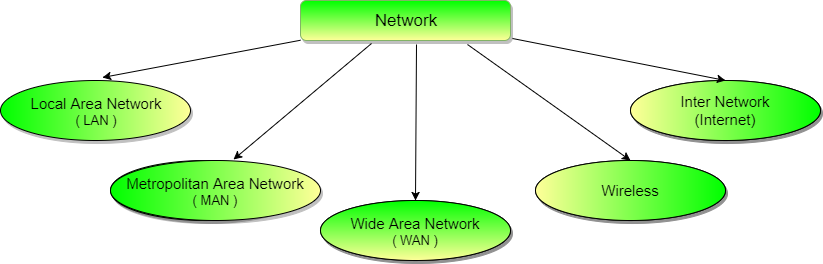
Communication Networks can be of following 5 types:

  1. Local Area Network (LAN)
  2. Metropolitan Area Network (MAN)
  3. Wide Area Network (WAN)
  4. Wireless
  5. Inter Network (Internet)


types of communication networks


Local Area Network (LAN)

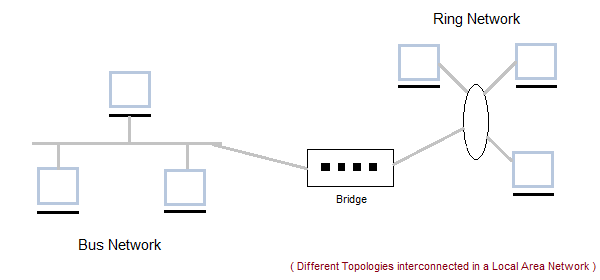
It is also called LAN and designed for small physical areas such as an office, group of buildings or a factory. LANs are used widely as it is easy to design and to troubleshoot. Personal computers and workstations are connected to each other through LANs. We can use different types of Topologies through LAN, these are Star, Ring, Bus, Tree etc.

LAN can be a simple network like connecting two computers, to share files and network among each other while it can also be as complex as interconnecting an entire building.

LAN networks are also widely used to share resources like printers, shared hard-drive etc.

Local Area Network


Characteristics of LAN

  • LAN's are private networks, not subject to tariffs or other regulatory controls.
  • LAN's operate at relatively high speed when compared to the typical WAN.
  • There are different types of Media Access Control methods in a LAN, the prominent ones are Ethernet, Token ring.
  • It connects computers in a single building, block or campus, i.e. they work in a restricted geographical area.

Applications of LAN

  • One of the computer in a network can become a server serving all the remaining computers called clients. Software can be stored on the server and it can be used by the remaining clients.
  • Connecting Locally all the workstations in a building to let them communicate with each other locally without any internet access.
  • Sharing common resources like printers etc are some common applications of LAN.

Advantages of LAN

  • Resource Sharing: Computer resources like printers, modems, DVD-ROM drives and hard disks can be shared with the help of local area networks. This reduces cost and hardware purchases.
  • Software Applications Sharing: It is cheaper to use same software over network instead of purchasing separate licensed software for each client a network.
  • Easy and Cheap Communication: Data and messages can easily be transferred over networked computers.
  • Centralized Data: The data of all network users can be saved on hard disk of the server computer. This will help users to use any workstation in a network to access their data. Because data is not stored on workstations locally.
  • Data Security: Since, data is stored on server computer centrally, it will be easy to manage data at only one place and the data will be more secure too.
  • Internet Sharing: Local Area Network provides the facility to share a single internet connection among all the LAN users. In Net Cafes, single internet connection sharing system keeps the internet expenses cheaper.

Disadvantages of LAN

  • High Setup Cost: Although the LAN will save cost over time due to shared computer resources, but the initial setup costs of installing Local Area Networks is high.
  • Privacy Violations: The LAN administrator has the rights to check personal data files of each and every LAN user. Moreover he can check the internet history and computer use history of the LAN user.
  • Data Security Threat: Unauthorised users can access important data of an organization if centralized data repository is not secured properly by the LAN administrator.
  • LAN Maintenance Job: Local Area Network requires a LAN Administrator because, there are problems of software installations or hardware failures or cable disturbances in Local Area Network. A LAN Administrator is needed at this full time job.
  • Covers Limited Area: Local Area Network covers a small area like one office, one building or a group of nearby buildings.


Metropolitan Area Network (MAN)

It was developed in 1980s.It is basically a bigger version of LAN. It is also called MAN and uses the similar technology as LAN. It is designed to extend over the entire city. It can be means to connecting a number of LANs into a larger network or it can be a single cable. It is mainly hold and operated by single private company or a public company.

Metropolitan Area Network


Characteristics of MAN

  • It generally covers towns and cities (50 km)
  • Communication medium used for MAN are optical fibers, cables etc.
  • Data rates adequate for distributed computing applications.

Advantages of MAN

  • Extremely efficient and provide fast communication via high-speed carriers, such as fibre optic cables.
  • It provides a good back bone for large network and provides greater access to WANs.
  • The dual bus used in MAN helps the transmission of data in both directions simultaneously.
  • A MAN usually encompasses several blocks of a city or an entire city.

Disadvantages of MAN

  • More cable required for a MAN connection from one place to another.
  • It is difficult to make the system secure from hackers and industrial espionage(spying) graphical regions.


Wide Area Network (WAN)

It is also called WAN. WAN can be private or it can be public leased network. It is used for the network that covers large distance such as cover states of a country. It is not easy to design and maintain. Communication medium used by WAN are PSTN or Satellite links. WAN operates on low data rates.

Wide Area Network


Characteristics of WAN

  • It generally covers large distances(states, countries, continents).
  • Communication medium used are satellite, public telephone networks which are connected by routers.

Advantages of WAN

  • Covers a large geographical area so long distance business can connect on the one network.
  • Shares software and resources with connecting workstations.
  • Messages can be sent very quickly to anyone else on the network. These messages can have picture, sounds or data included with them(called attachments).
  • Expensive things(such as printers or phone lines to the internet) can be shared by all the computers on the network without having to buy a different peripheral for each computer.
  • Everyone on the network can use the same data. This avoids problems where some users may have older information than others.

Disadvantages of WAN

  • Need a good firewall to restrict outsiders from entering and disrupting the network.
  • Setting up a network can be an expensive, slow and complicated. The bigger the network the more expensive it is.
  • Once set up, maintaining a network is a full-time job which requires network supervisors and technicians to be employed.
  • Security is a real issue when many different people have the ability to use information from other computers. Protection against hackers and viruses adds more complexity and expense.


Wireless Network

Digital wireless communication is not a new idea. Earlier, Morse code was used to implement wireless networks. Modern digital wireless systems have better performance, but the basic idea is the same.

Wireless Networks can be divided into three main categories:

  1. System interconnection
  2. Wireless LANs
  3. Wireless WANs

System Interconnection

System interconnection is all about interconnecting the components of a computer using short-range radio. Some companies got together to design a short-range wireless network called Bluetooth to connect various components such as monitor, keyboard, mouse and printer, to the main unit, without wires. Bluetooth also allows digital cameras, headsets, scanners and other devices to connect to a computer by merely being brought within range.

In simplest form, system interconnection networks use the master-slave concept. The system unit is normally the master, talking to the mouse, keyboard, etc. as slaves.


Wireless LANs

These are the systems in which every computer has a radio modem and antenna with which it can communicate with other systems. Wireless LANs are becoming increasingly common in small offices and homes, where installing Ethernet is considered too much trouble. There is a standard for wireless LANs called IEEE 802.11, which most systems implement and which is becoming very widespread.


Wireless WANs

The radio network used for cellular telephones is an example of a low-bandwidth wireless WAN. This system has already gone through three generations.

  • The first generation was analog and for voice only.
  • The second generation was digital and for voice only.
  • The third generation is digital and is for both voice and data.

Wireless Network


Inter Network / INTERNET

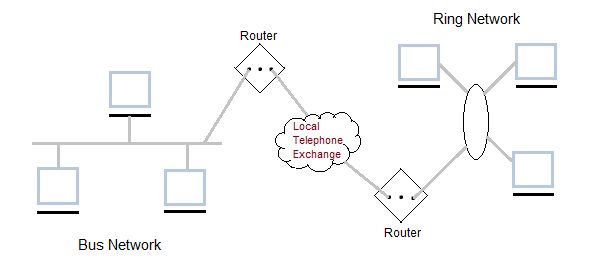
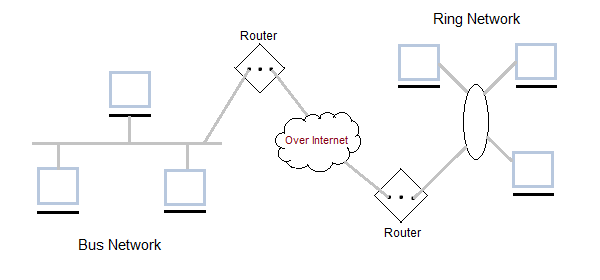
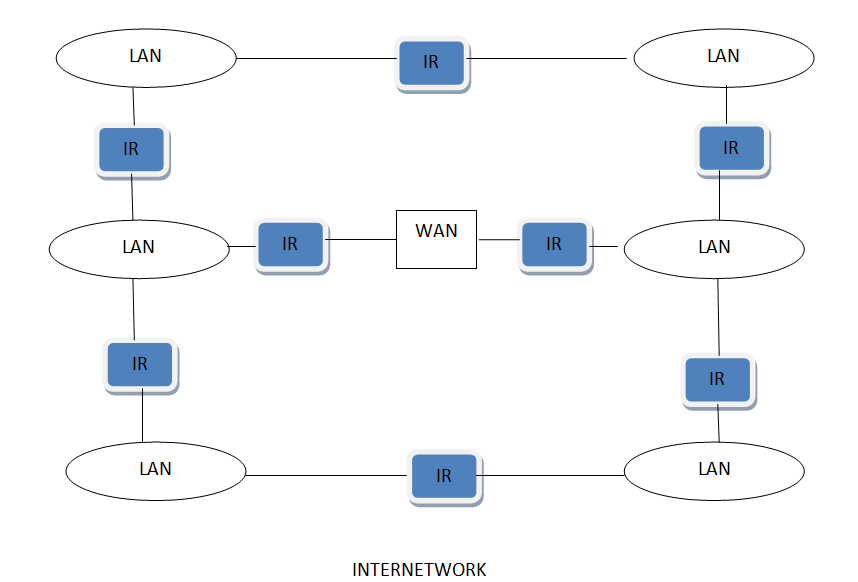
Inter Network or Internet is a combination of two or more networks. Inter network can be formed by joining two or more individual networks by means of various devices such as routers, gateways and bridges.

Inter Network with LAN and WAN


Internet network: access to the network allows users to use many resources. Over time the Internet network will replace books. This will enable users to discover information almost instantly and apply concepts to different situations. The Internet can be used for recreational, governmental, educational, and other purposes. Businesses in particular use the Internet network for research or to service customers and clients. Telephone network: the telephone network connects people to one another. This network can be used in a variety of ways. Many businesses use the telephone network to route calls and/or service their customers.

Some businesses use a telephone network on a greater scale through a private branch exchange. It is a system where a specific business focuses on routing and servicing calls for another business. Majority of the time, the telephone network is used around the world for recreational purposes.


DATA MODELS

June 12, 2020
DATA MODELS
EXPLAIN DATA MODELS

Data Models are fundamental entities to introduce abstraction in a DBMS. Data models define how data is connected to each other and how they are processed and stored inside the system. The very first data model could be flat data-models, where all the data used are to be kept in the same plane.

A Database model defines the logical design and structure of a database and defines how data will be stored, accessed and updated in a database management system. While the Relational Model is the most widely used database model, there are other models too:

  • Hierarchical Model
  • Network Model
  • Entity-relationship Model
  • Relational Model

Hierarchical Model :

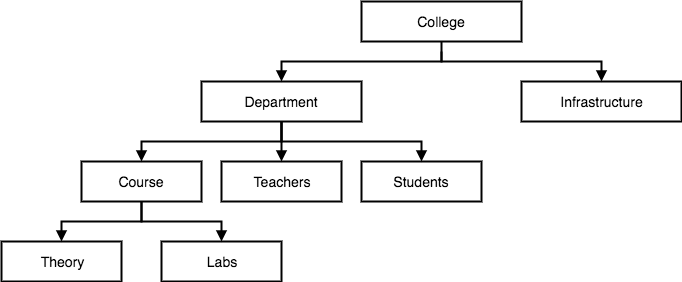
This database model organizes data into a tree-like-structure, with a single root, to which all the other data is linked. The hierarchy starts from the Root data, and expands like a tree, adding child nodes to the parent nodes.

In this model, a child node will only have a single parent node.

This model efficiently describes many real-world relationships like index of a book, recipes etc.

In hierarchical model, data is organised into tree-like structure with one one-to-many relationship between two different types of data, for example, one department can have many courses, many professors and of-course many students.

Hierarchical Model of database


Network Model

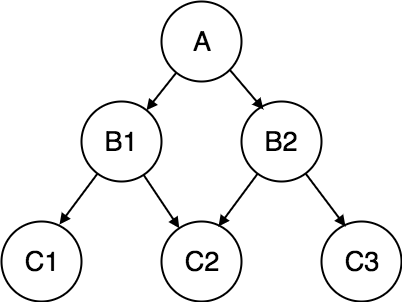
This is an extension of the Hierarchical model. In this model data is organised more like a graph, and are allowed to have more than one parent node.

In this database model data is more related as more relationships are established in this database model. Also, as the data is more related, hence accessing the data is also easier and fast. This database model was used to map many-to-many data relationships.

This was the most widely used database model, before Relational Model was introduced.

Network Model of database


Entity-relationship Model

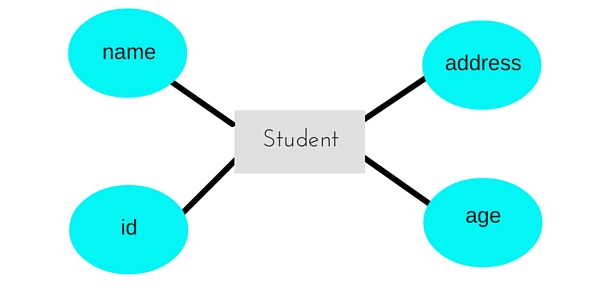
In this database model, relationships are created by dividing object of interest into entity and its characteristics into attributes.

Different entities are related using relationships.

E-R Models are defined to represent the relationships into pictorial form to make it easier for different stakeholders to understand.

This model is good to design a database, which can then be turned into tables in relational model(explained below).

Let's take an example, If we have to design a School Database, then Student will be an entity with attributes name, age, address etc. As Address is generally complex, it can be another entity with attributes street name, pincode, city etc, and there will be a relationship between them.

Relationships can also be of different types. To learn about E-R Diagrams in details, click on the link

E-R Model of database

Relational Model

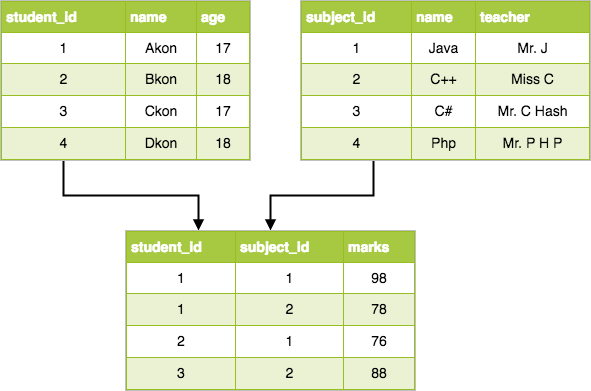
In this model, data is organised in two-dimensional tables and the relationship is maintained by storing a common field.

This model was introduced by E.F Codd in 1970, and since then it has been the most widely used database model, infact, we can say the only database model used around the world.

The basic structure of data in the relational model is tables. All the information related to a particular type is stored in rows of that table.

Hence, tables are also known as relations in relational model.

In the coming tutorials we will learn how to design tables, normalize them to reduce data redundancy and how to use Structured Query language to access data from tables.

Relational Model of database


POPULAR